In today’s digital world, many people spend a significant amount of time using web-based applications such as Gmail, WhatsApp Web, Slack, Trello, Notion, and countless other online tools. While these services work perfectly in a browser, some users prefer the convenience of dedicated desktop applications. This is where Nativefier comes in.
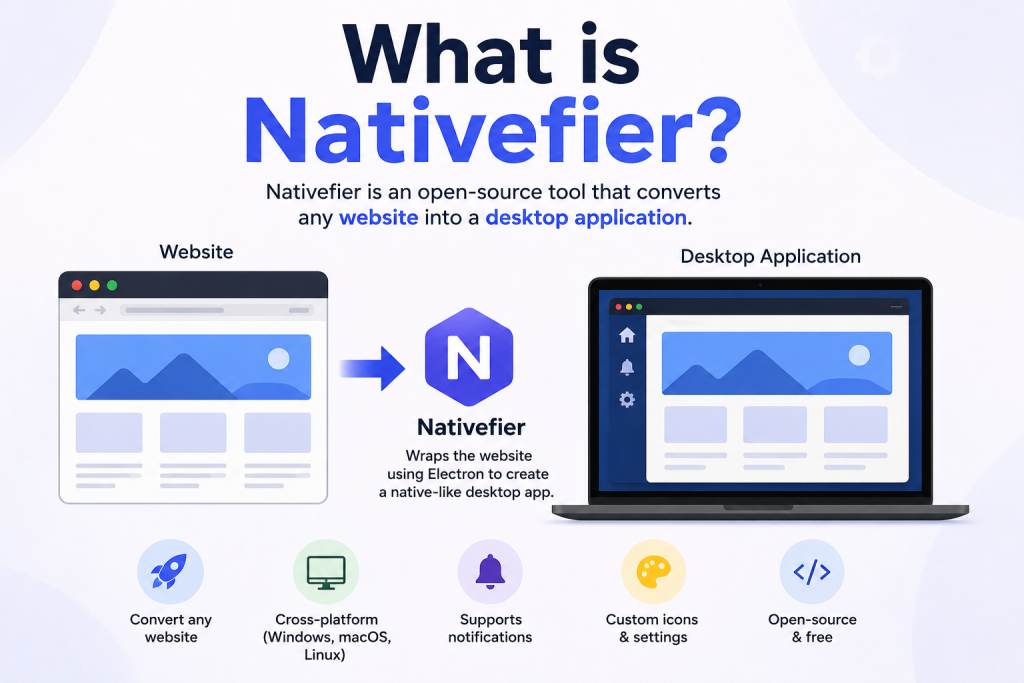
Nativefier is a popular open-source tool that allows users to convert virtually any website into a desktop application. Instead of constantly opening browser tabs, Nativefier creates standalone applications that run directly on your computer. Whether you use Windows, macOS, or Linux, Nativefier offers a simple way to transform web apps into native-like desktop experiences.
How Does Nativefier Work?
Nativefier uses Electron, a framework that enables web technologies such as HTML, CSS, and JavaScript to run as desktop applications. Electron powers many well-known applications including Visual Studio Code, Discord, and Slack.
When you provide a website URL to Nativefier, it creates an Electron-based application that loads the specified website. The resulting app behaves like a regular desktop program while maintaining access to the website’s functionality.
The process generally involves:
- Installing Nativefier through Node.js and npm.
- Running a command with the target website URL.
- Generating a desktop application package.
- Launching the application from your computer.
The entire process can be completed in just a few minutes.
Key Features of Nativefier
Create Desktop Apps from Any Website
One of Nativefier’s biggest strengths is its flexibility. Users can convert almost any website into a desktop application without needing advanced programming knowledge.
Cross-Platform Compatibility
Nativefier works across major operating systems, including:
- Windows
- macOS
- Linux
This allows developers and regular users to create applications regardless of their preferred platform.
Custom Application Icons
Users can personalize their applications by adding custom icons. This helps create a more professional and visually appealing desktop experience.
Built-In Notifications
Many websites support notifications, and Nativefier can integrate them into desktop environments, making it easier to stay informed without keeping browser tabs open.
Full-Screen Support
Applications generated by Nativefier support full-screen mode, providing a distraction-free environment for productivity-focused tasks.
Command-Line Customization
Advanced users can customize application behavior using various command-line options, including window size, user agents, application names, and more.
Benefits of Using Nativefier
Improved Productivity
Dedicated desktop applications help reduce browser clutter. Instead of managing dozens of tabs, users can launch individual applications directly from their desktop.
Easier Access
Applications created with Nativefier can be pinned to taskbars, docks, or start menus, allowing quick access with a single click.
Better Organization
Separating web apps into individual desktop applications can improve workflow management and reduce distractions.
No Need for Official Desktop Apps
Many web services do not offer official desktop applications. Nativefier fills this gap by enabling users to create their own versions.
Open-Source and Free
Since Nativefier is open-source software, it is freely available for personal and professional use. Users can also contribute to its development and improvements.
Common Use Cases for Nativefier
Nativefier is often used to create desktop versions of popular web services such as:
Communication Tools
Users frequently convert messaging platforms into standalone applications to receive notifications and maintain easy access.
Examples include:
- WhatsApp Web
- Telegram Web
- Messenger
- Discord Web
Productivity Platforms
Project management and productivity tools can become easier to manage when used as dedicated applications.
Popular examples include:
- Trello
- Notion
- Asana
- ClickUp
Email Services
Many users create desktop applications for email services to separate communication from regular web browsing.
Examples include:
- Gmail
- Outlook Web
- Yahoo Mail
Streaming and Entertainment
Streaming websites can also be transformed into desktop applications for a more focused experience.
Examples include:
- YouTube
- Spotify Web Player
- Netflix
Limitations of Nativefier
While Nativefier offers many advantages, it is important to understand its limitations.
Not Truly Native Applications
Although Nativefier apps look like desktop applications, they are essentially websites running inside Electron containers. They may not offer the same performance as fully native software.
Resource Consumption
Electron-based applications can consume more memory and system resources compared to traditional native applications.
Website Dependency
The functionality of a Nativefier app depends entirely on the target website. If the website changes or experiences issues, the desktop app may also be affected.
Maintenance Requirements
Users may occasionally need to rebuild applications when websites introduce significant updates or compatibility changes.
Who Should Use Nativefier?
Nativefier is ideal for:
- Developers who want quick desktop app prototypes.
- Remote workers who rely on web-based tools.
- Productivity enthusiasts seeking better workflow organization.
- Linux users lacking official desktop applications.
- Anyone who wants browser-based services as standalone applications.
Even users with minimal technical experience can benefit from Nativefier thanks to its straightforward setup process.
Is Nativefier Safe to Use?
Nativefier itself is generally considered safe because it is open-source and widely used within the developer community. However, users should always download software from official sources and exercise caution when creating applications from unfamiliar websites.
Since the generated application essentially loads a website, users should only create apps from trusted and reputable web services.
Conclusion
Nativefier is a powerful and practical tool that bridges the gap between web applications and desktop software. By allowing users to convert websites into standalone desktop apps, it enhances productivity, improves accessibility, and provides a more organized computing experience.
Whether you want a dedicated Gmail app, a standalone WhatsApp Web client, or a desktop version of your favorite productivity platform, Nativefier offers a simple and effective solution. Its cross-platform support, customization options, and open-source nature make it a valuable tool for developers and everyday users alike.
As web applications continue to dominate modern workflows, Nativefier remains an excellent option for anyone looking to bring their favorite online services directly to their desktop.